
2026 MH-60R Helicopter Desktop Two-Seat Crew Simulator and Trainer
The US Navy in conjunction with industry has developed and deployed a 2-seat crew simulator and training tool used for training for the US and international versions of the MH-60R helicopter. Since the MH-60R helicopter can be configured differently for different nations, the crew simulator is also adapted to the specific versions of the helicopter. Some nations flying or soon to be flying the MH-60R include Australia, Denmark, Greece, Norway, Spain, India, and South Korea. The crew simulator, called the Operator Machine Interface Assistant (OMIA), is primarily an expandable, easily modifiable low-cost PC-hosted desktop 2-seat crew simulator in use by US and non-US Navy training squadrons, and fleet squadrons at port, and at sea. The OMIA crew simulator allows the front-seat airborne tactics officer (ATO) to work in coordination with the Sensor Operator (SO) to prosecute a mission. The user interface emulates how the helicopter interface changes based on the inputs of both operators. OMIA provides training in most aspects of flight operations except flying, this includes but is not limited to navigation operations, radio operations, emergency operations, RADAR, ISAR, ESM, FLIR, and both active and passive acoustics. The two crew members can work together and perform these operations in a coordinated fashion as they would during actual flights. This paper demonstrates the significant training benefit OMIA provides for both single-seat and 2-seat training for the navies that fly the MH-60R. As well as the potential for low-cost portable simulators in general to provide high-fidelity training on both land and at sea, as well as a tool to support future tactics development.
1. Introduction
The US Navy flies the MH-60R helicopter, utilizing Lockheed-Martin’s Common Cockpit design. The Common Cockpit includes all the flight and mission instrumentation and enables both the pilot and co-pilot to share workload through dual flight and mission instrumentation; the co-pilot also acts as the airborne tactics officer (ATO). As can be seen in Figure 1 the pilot and copilot each have two LCD screens, one of which is the Mission Display (MD) and the other is the Flight Display (FD). The pilots interact with these displays primarily through a trackball-based pointing device (PD) and a set of bezel keys around each display. There is also a Control Display Unit (CDU) in the center console, as well as various other panels in the center console, used for operator inputs.
For over a decade the US Navy’s PMA-205, in conjunction with industry, has developed, deployed, and updated a flexible, low-cost PC-hosted crew trainer for the Navy’s MH-60R (Romeo) helicopters called the Operator Machine Interface Assistant (OMIA).
OMIA is now used by U.S. and international Navy training squadrons, helicopter maintenance organizations, and by fleet squadrons at port and at sea. Nations including Australia, Denmark, Greece, Norway, Spain, India, and South Korea have configurations of the MH-60R, and OMIA adapts to their specific requirements. OMIA provides much of the cockpit interface for the front seats of the MH-60R and the Sensor Operator (SO) station that sits behind the pilot stations. OMIA provides training in most aspects of flight operations except flying, this includes but is not limited to navigation operations, radio operations, emergency operations, RADAR, ISAR, ESM, FLIR, DMAD, and both active and passive acoustics.
The crew consists of a Pilot, a co-polit who is also the airborne tactics officer (ATO), and a Sensor Operator (SO). Even though there are 3 seats in the actual helicopter, most of the non-flying aspects of a mission is conducted by the ATO and SO, since the pilot is mainly focused on the flight operations of the helicopter. Thus a 2-seat trainer provides the crew coordination aspect of training sufficiently.
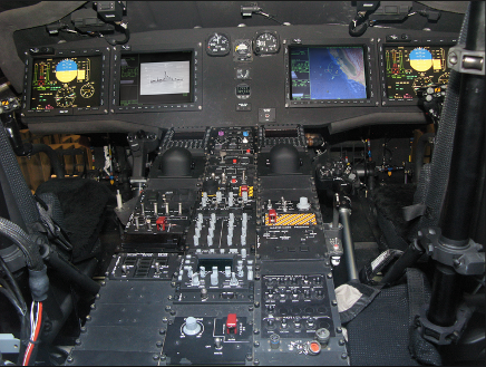
Figure 1. MH-60 Common Cockpit
Due to the extensive functionality provided by OMIA, it is also leveraged for tactics development and documentation by Navy test squadrons. It is far easier to perform tactics development at one’s desk even if a simulator or helicopter is available. This allows for more rapid development and savings on resources since the full-flight simulator or helicopter is only utilized when required, and they are incredibly expensive to operate.
Another benefit of OMIA is that it is designed for rapid modification to meet changing requirements arising from software updates, required modifications to support non-US Navy configurations and the addition of functionality to the MH-60R. This has resulted in OMIA on many occasions being the only source for certain functionality beyond actual helicopters, and the Manned Flight Simulator (MFS) facility at PAX River NAS. As of the time of this paper the modeling and simulation of the digital magnetic anomaly detection (DMAD) functionality is only available in a few helicopters, at MFS and in OMIA.
2. Overview
The core of OMIA (Figure 2) is a standalone Java program that operates under any standard Windows, Linux or Macintosh computer that is installed with a Java Runtime Environment (JRE). The standalone OMIA provides an introduction to the Common Cockpit, including the Mission Display (Figure 3), the Flight Display (Figure 5), the Control Display Unit (CDU) (Figure 7), and several other helicopter control panels. A major benefit of the standalone core OMIA trainer that the Navy requires, is that the application uses no external licensing, and therefore it can be distributed freely to anyone in the US Navy via compact disc or DoD SAFE. In addition, the core system also supports a number of optional extensions to meet other training needs.
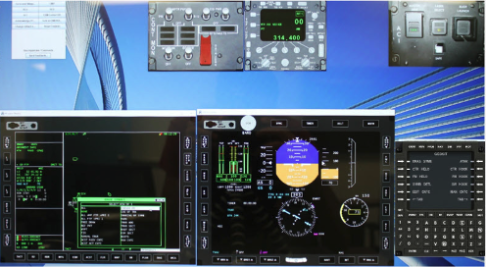
Figure 2. OMIA Part-Task Trainer (PTT)
A different executable is created for each configuration. Presently there are four for the MH-60R. One for pilot/co-pilot standalone, another for sensor operator standalone, and similarly one for pilot/co-pilot crew-trainer mode, and one for sensor operator crew-trainer mode.
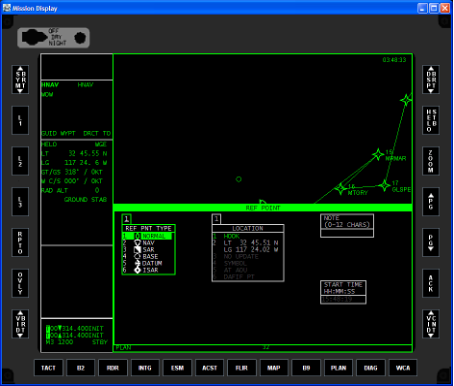
Figure 3. OMIA Mission Display with Menu Visible
When using the two-seat crew trainer mode, the computers need to be on the same network or simply connected to each other via an ethernet cable, see Figure 4. The pilot/co-pilot starts up their version and then has the sensor operator start up their version and then the two connect. In this scenario, both operators will see the same world, including changes made by each other.
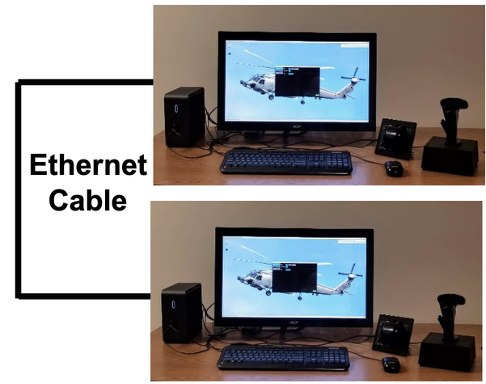
Figure 4. Two-Seat Crew Trainer Mode Configuration
The architecture is designed to allow the OMIA trainer to automatically configure itself during the startup process to deliver the most optimum training environment possible. OMIA is able to detect if optional hardware is installed and will work correctly with new hardware automatically. The simplest example is multiple monitors: by attaching two displays, the Mission Display, shown in Figure 3, and the Flight Display, shown in Figure 5, can be displayed on separate monitors, with one of the monitors also displaying the Center Console panels. The bezel keys on the flight display and mission display may be operated using finger pushes on a touch screen in order to emulate the ergonomics of the actual helicopter more accurately. OMIA can support a third screen, which can be a touch screen and used for Center Console panels and placed horizontally so that the user can push the buttons in a way more similar to how it is done in the aircraft instead of using the mouse.
OMIA has the ability to integrate with a third-party flight simulator. Every time OMIA starts it checks to see if a compatible flight simulator (e.g., FlightGear) is already running. If it is running, OMIA attaches itself to the flight simulator and then gets its position, speed and other flight information from the flight simulator.
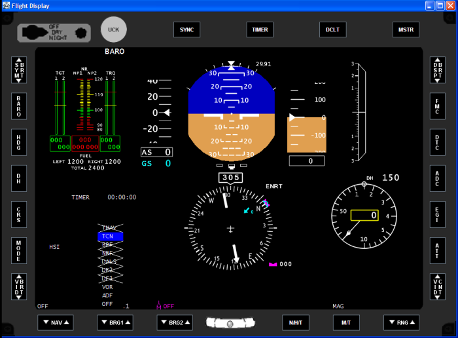
Figure 5. OMIA Flight Display
In this configuration, the user is able to have the external view be completely generated by the flight simulator, see Figure 6. While the Flight Display, Mission Display and all of the other panels are still being used from the core OMIA. However, any other information such as ground speed, latitude/longitude location, or motion is all taken from the flight simulator. This is very beneficial if a user wishes to fly or see the terrain while navigating a search and rescue pattern. As one navigates, the helicopter may be guided along the search and rescue pattern on the Mission Display, and as search and rescue points are reached or captured the pattern will update appropriately. When using a flight simulator, other hardware can be used if desired, such as a joystick; or a head mounted display with head tracking may be added to improve the means for emulating the full field of view. Flying can be performed solely using a joystick, or a joystick and a separate control for the collective, and/or COTS pedals can be added.
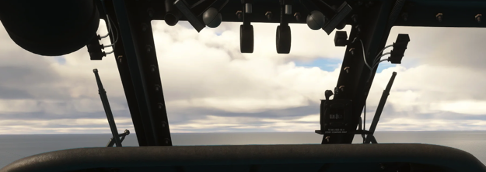
Figure 6. External View via Flight Simulator
Most use cases are performed without the use of an external flight simulator. In this case the helicopter can still be moved as needed, for example again to fly a pattern, simply by using keyboard keys. In this case the helicopter is acting more as if in an auto pilot situation.
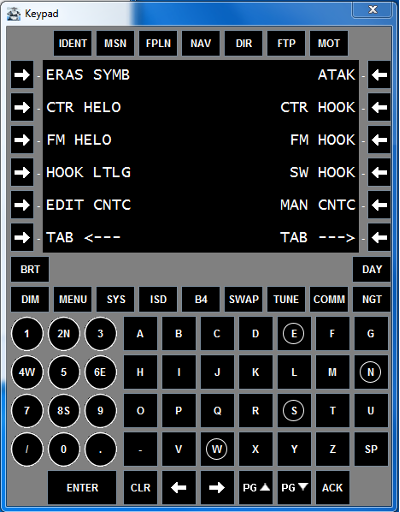
Figure 7. Control Display Unit (CDU)
3. Enhancing Crew Learning Experience
OMIA is much more than the Flight Display, Mission Display, CDU, and the other items described above. The MH-60R has other major systems that can be trained via OMIA. All these capabilities make OMIA suitable for a wide range of training environments. In a classroom, multiple OMIA stations can be deployed in parallel, supporting group instruction. At sea, OMIA can be run from laptops or small form factor PCs, enabling on-board training even when space is limited. Below is more information about other panels and capabilities in OMIA that are valuable for training in both single-seat mode and crew-trainer mode.
Center Console Panels
As can be seen in Figure 1, there are many panels in the Center Console. OMIA emulates some of these, since these are used less frequently, they are not all shown on screen at all times. There is a Control Panels window where the user can select which panel(s) to display, see Figure 8. The CMP panel is shown in Figure 8, this panel is used for controlling the power to the computers and EGIs. The RCU panel is shown in Figure 10, this panel is used for emergency radio communications.
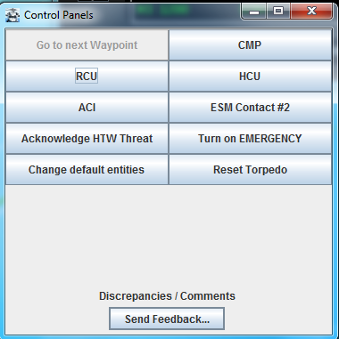
Figure 8. OMIA GUI to Select Options
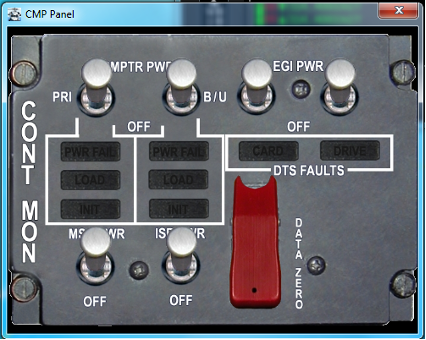
Figure 9. CMP Panel
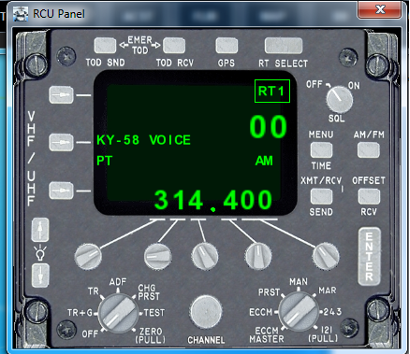
Figure 10. RCU Panel
Forward Looking InfraRed (FLIR)
A system found on the MH-60R helicopters is the Forward Looking InfraRed (FLIR) system. The FLIR user mainly controls the FLIR operations via a Hand-Control Unit (HCU), as shown in Figure 11. Industry has developed for the Navy a portable HCU hardware facsimile that can be connected to OMIA via USB, see Figure 12. In addition, if the hardware is not available, there is an option to bring up a window that provides a software emulation of the FLIR HCU, see Figure 13.
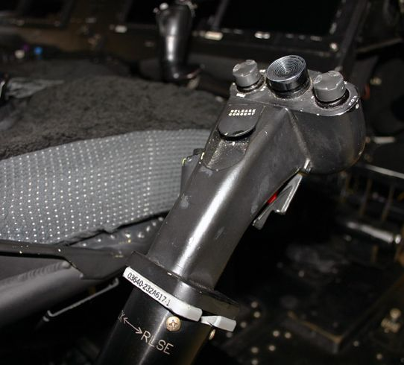
Figure 11. FLIR Hand Control Unit (HCU)
OMIA reacts the same way to the HCU hardware as it does to the presence/absence of other hardware units; when OMIA starts up it checks whether a FLIR HCU hardware is attached. If it is attached, the software will read input from it, if it is not detected, then the software equivalent is available.
The hardware FLIR HCU teaches both the tactile feedback and muscle memory of a physical hand control unit, in addition to all the training available with just the software FLIR HCU.
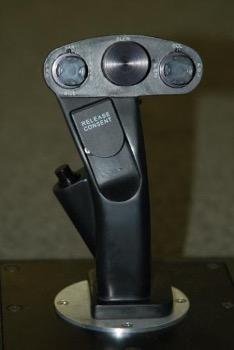
Figure 12. Low-cost HCU used for Training
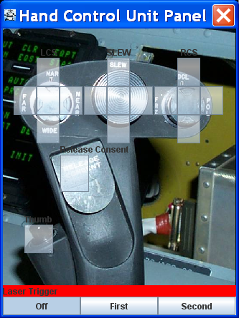
Figure 13. Simulated HCU in OMIA
An example of a FLIR, with the MH-60R overlay, as shown on a Mission Display in OMIA, is shown in Figure 14. The generation of FLIR images is a difficult task in real-time. Usually, FLIR simulators are very expensive units incorporated into multi-million-dollar simulators. For OMIA a simpler solution is created to provide a high level of learning benefit sans the cost. The FLIR implementation in OMIA uses WorldWind, an open-source virtual globe API supplied by NASA. Much of the learning related to FLIR concerns the operation of the FLIR menus and other operations that are part of the software overlay. Through the combination of the hardware FLIR HCU and the overlay menus and other functions with the 3D world view, a great deal of learning is facilitated. For example, users can zoom in and out, slew, adjust image polarity, cycle through camera modes, and navigate through on-screen menus.
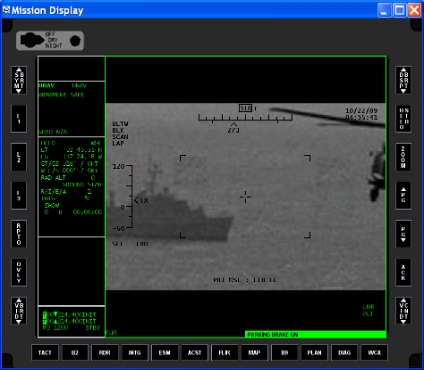
Figure 14. Screenshot of FLIR in OMIA
Acoustics
Another very important capability of the MH-60R is both passive and active acoustics. To support this there is also a version of OMIA that includes an Acoustics Trainer Simulator (ATS) enhancement, this is referred to as OMIA-ATS. This capability is mainly used by the SO and the ATO. See Figure 15 for an image of the SO station. OMIA-ATS requires capabilities currently only available under Linux, so OMIA-ATS is restricted to use on Linux. This enhancement is supplied to the Navy as a complete hardware/software solution, the OMIA-ATS hardware includes a computer/laptop with an external touch screen and OMIA-ATS installed.
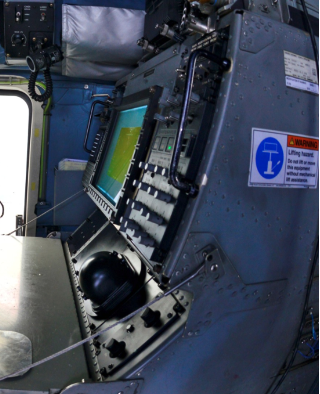
Figure 15. Sensor Operator Station
The user interface for the acoustics aspects utilizes the same menus and CDU as most of the rest of the user interface. OMIA-ATS provides a highly capable training tool for MH-60R sonar operators. The crew trainer is available in both the core OMIA setup as well as the OMIA-ATS setup. A screenshot of OMIA running in the SO mode is shown in Figure 16.
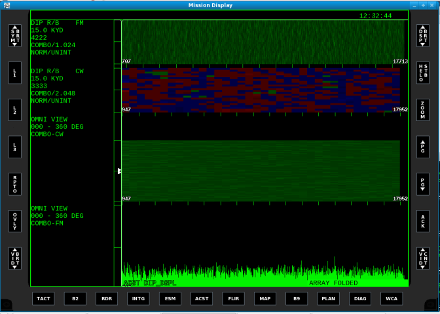
Figure 16. OMIA-ATS Running in SO Mode
The (non-ATS) OMIA benefits as much as possible from the acoustics enhancements, so OMIA allows the learner to get an introduction to acoustics operations and menus but does not allow for pinging and viewing realistic acoustic returns as OMIA-ATS does.
The core OMIA, OMIA-ATS, and the crew trainer:
- Provides system familiarization for displays and keysets (with or without instructor support).
- Supports independent skills review in a Training facility environment.
- Prepares operators to take full advantage of full-flight simulator training sessions.
- Provides a platform for acoustic return recognition training.
- Supports independent skills review for deployed squadron personnel.
- Provides a portable platform for crew coordination training.
4. Two-Seat Crew Simulator and Trainer
A great deal of operational and as well as tactical knowledge can be obtained by performing training individually. However, in flight the front seat ATO works in conjunction with the back seat sensor operator (SO) to complete the mission. There is a great deal of verbal communications in addition to the ability to share information from each other’s screens. The two seat crew simulator and trainer facilitates this coordinated training.
That is, OMIA supports shared situational awareness, division of responsibility, communication protocols, and scenario rehearsal. Failures and overloads can be introduced, forcing teamwork. By emphasizing crew resource management, OMIA elevates desktop training beyond individual skills.
Figure 17 shows an example of what may be viewed by the ATO Station, including the Flight Display and what might be shown on the SO station at the same time, note the SO station has some SO only panels just as the Flight Display and center console panels are only available to the ATO.
Scenario based training is available in the OMIA-ATS crew trainer thanks to a built in Scenario Editor. Therefore, different scenarios are provided by default, and the Navy users can also build their own scenarios. For example, an anti-surface scenario could be built and then run on the crew trainer. During training on the crew trainer at certain times during the training the ATO might be managing the RADAR and ESM contacts while the SO is operating the FLIR in an attempt to classify vessels in the scenario. When the ATO designates a suspicious radar contact, the SO slews the FLIR and confirms it as a fast attack craft. From there the crew would continue the scenario, for example, the crew might coordinate a simulated engagement sequence.
Similar scenarios can be used to help train sonar operations.
The crew trainer ensures that sonar training can occur both ashore and at sea. This portability is particularly valuable during deployments, where operators can use downtime to rehearse or maintain proficiency. OMIA-ATS thus extends OMIA’s utility from general mission familiarization to full-spectrum acoustic training.
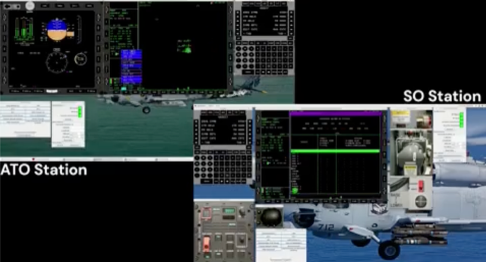
Figure 17. Sample ATO & SO Views in Crew Trainer
5. Conclusion
The complexity, as well as the number of the sensors under control by the crew on the MH-60R helicopters, pose a difficult training task for the Navy. To meet this challenge, the US Navy’s PMA-205 in conjunction with industry has developed and deployed OMIA, a flexible, low-cost PC-hosted desktop crew trainer. OMIA has evolved with the changing helicopter software; with every iteration, it has become an ever more functional trainer providing greater flexibility and benefit to the Navy.
OMIA demonstrates the utility of designing a flexible system that allows for quick responses to ever-changing demands. Since the software configuration of the helicopter evolves, OMIA needs to evolve also and thus development tools have been developed to facilitate this evolution as rapidly as possible. OMIA program has been able to adapt to new challenges with a minimum amount of additional development.
The addition of multi-seat training has greatly expanded the utility and coordinated crew training now available outside the helicopter itself for multi-million-dollar simulators that cost hundreds of dollars an hour to operate. In addition, this capability is available for anywhere anytime training on land or at sea. OMIA’s capabilities benefit both the US Navy and the expanding list of navies throughout the world that have chosen the MH-60R.